24 Monochrome Vector Square Patterns for Practical Creative Projects
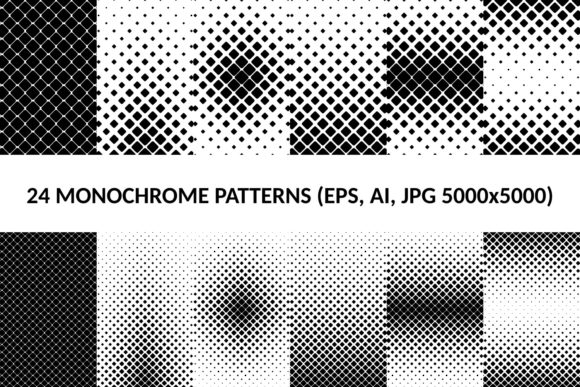
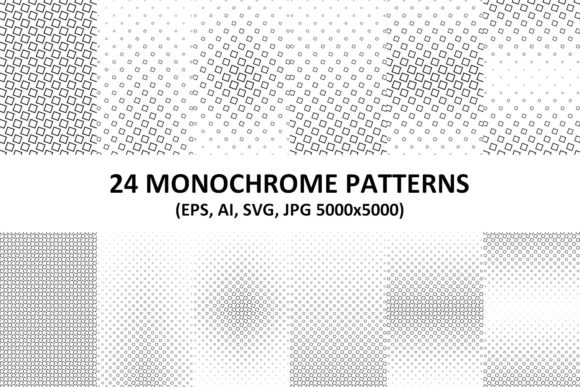
When you need visual texture without the noise, monochrome square patterns step in. This set of 24 vector patterns gives you clean, repeatable designs that work across print, web, and branding. Whether you are building a consistent Instagram presence, designing a product label, or creating presentation backgrounds, these patterns offer structure without distracting from your message. The package includes 24 vector AI, 24 vector EPS, 24 vector SVG, and 24 JPG files at 5000x5000 pixels. That means no matter what software you use or what final output you need, the format is ready to go.
Building a Cohesive Brand Identity
For freelancers and small business owners, brand consistency is often the difference between looking amateur and looking established. Monochrome vector square patterns give you a library of textures that can unify everything from your website header to your packaging tape. Because the patterns are monochrome, they don't compete with your brand colors. Instead, they act as a structural backbone.
Imagine you are designing a brand identity for a minimalist skincare line. You can use a herringbone square pattern as a watermark on ingredient lists, a dotted grid on business cards, and a linear pattern on the outer box. Using the vector AI or EPS files, you can adjust the stroke weight to match the brand's personality—thicker lines for a bolder look, thinner lines for elegance. The same pattern, adapted across multiple touchpoints, creates a professional cohesion that customers notice.
Where the formats matter: If you are handing off files to a commercial printer, EPS is widely supported. If you are creating digital assets yourself, AI files keep your layers intact for fast editing. The JPG files serve as quick references or social media squares when you need speed over flexibility.
Digital Content and Social Media Batching
Bloggers, marketers, and content creators know the struggle of maintaining a visually consistent feed. You need backgrounds for quote graphics, highlight covers, promotional banners, and post backgrounds. With 24 distinct patterns, you can batch-create an entire month of content in a single sitting.
Start by opening the SVG files in Canva or directly in your web design tool. Because SVG is a vector format, you can scale it up or down without losing clarity. Use one pattern for Monday motivation quotes, another for product features, and a third for behind-the-scenes stories. The monochrome nature ensures the text remains legible and the overall aesthetic stays clean.
The 5000x5000 pixel JPG files are particularly useful for platforms like Pinterest or Instagram, where high-resolution images perform better. You can crop into the pattern heavily and still retain crisp detail. This means you get multiple unique backgrounds from a single pattern file, extending the value of the pack even further.
Print Production and Packaging Made Simple
If you run a small product-based business or you are a hobbyist selling at local markets, packaging design can feel overwhelming. Hiring a designer for custom patterns is expensive. Using generic clip art looks unprofessional. Monochrome vector square patterns fill this gap perfectly.
Consider a candle maker who wants a unified look for soy wax labels. Single-color printing keeps costs low, and monochrome patterns print cleanly without registration issues. You can import the EPS file into your design software, change the black to your brand color, and print at home or through a local shop. The vector format guarantees sharp lines at any size.
A 5000x5000 pixel resolution means the JPG files are ready for large format printing. You can print them at 300 DPI up to roughly 16x16 inches without any loss of quality. This makes them suitable for posters, signage, or product packaging. For smaller items like stickers or hang tags, you have plenty of resolution to work with, even if you need to crop extensively.
Educational Materials and Presentations
Educators, trainers, and course creators often need materials that look polished without being distracting. A busy background can pull attention away from the content, while a plain white slide feels unfinished. Monochrome patterns provide a subtle texture that signals professionalism.
Use a geometric square pattern as a full background for slide decks. Because it is vector SVG, it will render perfectly on projectors, smartboards, and laptop screens without pixelation. For handouts and worksheets, place a lightened pattern behind the title section or use it as a border element. The result is a cohesive set of materials that looks intentionally designed.
A practical scenario: A math tutor creates a series of worksheets for geometry students. Using a grid-based monochrome pattern as a background creates a subtle connection to the subject matter, making the materials visually engaging without overwhelming the actual problems. Consistent use of the same pattern family across the entire semester reinforces brand recognition for the tutoring business.
UI/UX and Web Design Applications
Web designers and developers need assets that are lightweight, scalable, and responsive. SVG files are code-based, meaning they load quickly, adapt to any screen size, and remain sharp on retina displays. Monochrome vector square patterns are ideal for hero section backgrounds, loading screens, or repeatable textures behind content blocks.
Because the patterns are monochrome, they integrate smoothly with any color scheme. You can use CSS to change the stroke color dynamically, or overlay them with a gradient to create depth without adding image weight. This performance advantage translates directly to better user experience and faster page loads.
What to consider for UI work: SVG format is your best friend here. Make sure you test the pattern at different breakpoints—some dense patterns may need scaling down on mobile to avoid visual clutter. The vector format makes this adjustment simple, as you can easily modify the pattern's scale or rotation within your code editor or design tool.
Choosing the Right Format for Your Workflow
With four formats included, your choice depends on your specific project and skill level. Here is a practical breakdown of where each format excels:
- AI (Adobe Illustrator): Best for designers who need full layer control and plan to heavily customize the pattern. You can edit individual squares, change stroke weights, and combine multiple patterns into new compositions.
- EPS: A universal vector format compatible with many programs beyond Adobe, such as CorelDRAW or Affinity Designer. Ideal for professional print workflows where the printer may not have the latest software version.
- SVG: The go-to format for web and screen use. It is lightweight, responsive, and can be styled with CSS. Perfect for developers and digital content creators working in platforms like Canva, Sketch, or Figma.
- JPG (5000x5000): The universal option for quick use. No special software required. Ideal for social media graphics, online marketplaces, or any scenario where you need a plug-and-play background. The high resolution ensures print flexibility as well.
If you are a print designer asking for vector files, EPS and AI are your primary tools. If you are a web developer, SVG is the obvious choice. If you are a non-designer looking for plug-and-play assets, start with the JPG files and transition to vectors when you need more control.
Licensing and Real-World Use
Before using the patterns commercially, verify the licensing terms that come with your specific pack. Most high-quality vector packs allow commercial use in client projects, merchandise, and digital products, but restrictions on redistribution or reselling pattern files raw are standard. This protects both you and the original creator. For small business owners, having clear commercial rights means you can confidently use the patterns on products you sell without legal concerns.
Monochrome patterns offer a distinct advantage: they are format-agnostic. Unlike complex multicolor designs that rely on specific color profiles, monochrome works universally in RGB for screens and CMYK for print. If you are printing yourself, you only need black ink, which reduces printing costs and ensures consistent results across different printers.
Modification tips: Vector files allow you to break apart elements, rotate line angles, or change stroke thickness. Do you need this control? If you plan to create a unique look that stands out from the original pack, investing time in learning the vector editing workflow pays off. If you simply need a clean background fast, the JPG files deliver immediate results without a learning curve.
Whether you are a freelancer building a brand from scratch, a marketer filling a content calendar, or a small business owner designing packaging, the 24 Monochrome Vector Square Patterns provide a versatile foundation. They sit in that sweet spot between minimal and decorative, offering enough visual interest to elevate your work without overwhelming it. With four formats ready to go, your next project has all the structure it needs to look intentional and professional.