24 Monochrome Rounded Square Patterns: Evaluating a Versatile Vector Design Resource
When building a visual identity, selecting the right pattern set can significantly influence both workflow efficiency and final output quality. The 24 Monochrome Rounded Square Patterns package offers a focused collection of geometric assets that balances simplicity with adaptability. This article examines what this resource actually delivers, how it compares with other pattern categories, and the practical factors to weigh before committing to any single design toolkit.
What the Package Includes and Why Format Matters
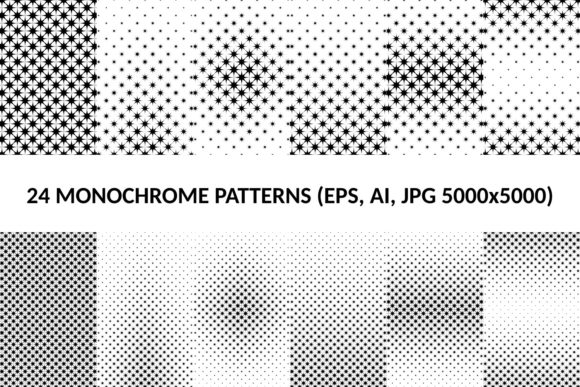
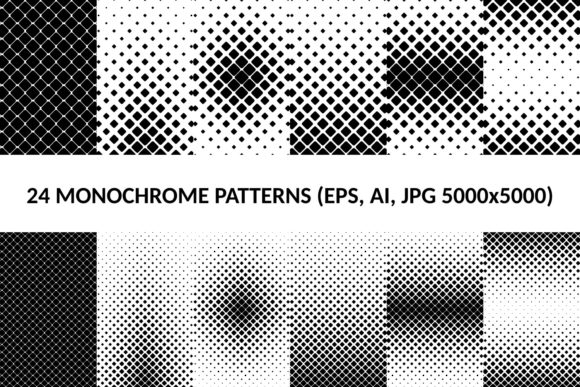
The core offering is straightforward: twenty-four rounded square patterns in a monochrome palette, plus an additional twenty-four diagonal variants built on the same rounded square motif. Each pattern is provided in four vector formats—AI, EPS, SVG—alongside a 5000x5000 pixel JPG version. This format coverage means the patterns can be used across virtually any design environment, from Adobe Illustrator to web-based tools like Figma or Canva, as well as in print production workflows where high-resolution raster assets are necessary.
The monochrome constraint is worth noting. Rather than offering a spectrum of colors, each pattern relies on black, white, or grayscale tones. This is not a limitation but a deliberate design choice. Monochrome patterns tend to integrate more cleanly into branding systems, where color schemes are already defined. They also reduce visual noise when used as backgrounds, textures, or repeating elements alongside other content.
The diagonal variant set extends the utility of the standard patterns. While the standard rounded squares create a sense of order and uniformity, the diagonal versions introduce directional movement and visual tension. Having both options in one package saves the time that might otherwise be spent rotating, skewing, or reworking a single pattern to achieve a similar effect.
How This Resource Compares with Other Pattern Categories
To evaluate whether 24 Monochrome Rounded Square Patterns fits your needs, it helps to compare it against broader pattern categories designers commonly choose from.
Geometric versus Organic Patterns
Geometric patterns, including rounded squares, are inherently structured and predictable. They work well in contexts that demand order—corporate presentations, UI backgrounds, tech branding, or architectural themes. Organic patterns, such as hand-drawn textures, watercolor splashes, or natural motifs, offer warmth and unpredictability but can clash with clean layouts. If your project leans toward minimalism or modern design, the structured nature of rounded squares is likely a better fit. For editorial or artistic work where irregularity is desired, organic alternatives may serve you better.
Monochrome versus Full-Color Sets
Full-color pattern packs provide immediate visual impact but often require more adjustment to align with existing brand palettes. A monochrome set like this one acts as a neutral foundation. You can overlay your own brand colors, adjust contrast levels, or use the patterns as texture layers without fighting pre-set hues. The tradeoff is that monochrome patterns may feel less vibrant out of the box. If your goal is a ready-to-use colorful background without further editing, a full-color set might be more convenient. If you value flexibility and long-term reuse across multiple projects, the monochrome approach is generally more practical.
Rounded versus Sharp Geometrics
Rounded squares occupy a specific perceptual space. They are softer than sharp squares or rectangles, which can feel rigid or aggressive, but more structured than circles or freeform shapes. This makes them particularly effective for interfaces, icons, and branding that aim to feel approachable yet professional. Sharp geometric patterns might be preferred for industrial, cutting-edge, or high-tech presentations where precision and edge are part of the message. If your audience skews toward conservative or formal contexts, sharp geometry may better communicate authority.
Strengths of the 24 Monochrome Rounded Square Patterns Package
Several practical strengths make this resource stand out for certain use cases.
- Vector scalability: Because the patterns are provided in AI, EPS, and SVG formats, they can be scaled to any size without quality loss. The 5000x5000 JPG also covers most print and screen resolutions without pixelation.
- Consistent motif vocabulary: All forty-eight patterns share the same rounded square family, which means mixing or layering them creates a cohesive visual language rather than a disjointed collage.
- No color decision overhead: The monochrome palette eliminates the need to harmonize multiple colors, which is a genuine time-saver when working under tight deadlines or with non-design stakeholders.
- Diagonal flexibility: The diagonal variant gives you an immediate second dimension of visual interest without requiring manual transformation of the standard patterns.
- Print-ready resolution: At 5000x5000 pixels, the JPG files are suitable for large-format printing, banners, and presentation backdrops where vector support may not be available.
Tradeoffs and Limitations to Consider
No resource is universally optimal. Understanding the tradeoffs of this pattern set helps you decide whether it aligns with your specific project demands.
Limited color range
While monochrome is a strength for flexibility, it can also be a drawback if you need patterns that already incorporate brand colors or accent hues. You will need to apply color overlays manually, either in your design software or through CSS or SVG styling. For users who prefer an out-of-the-box colored solution, this adds an extra step.
Narrow shape vocabulary
All patterns are built from rounded squares. If your project requires variety across different geometric forms—circles, triangles, hexagons, or mixed shapes—this set will not cover those needs. You would either need to supplement with additional pattern packs or create custom alternatives.
No pre-built color variants
The package does not include multiple color versions of each pattern. Some designers appreciate the simplicity of a single grayscale source file, while others would prefer having light, dark, and accent-colored variants ready to drag and drop. Be prepared to apply your own adjustments if you need tonal variation.
Best-Fit Situations for This Pattern Set
Based on the package composition, certain scenarios lend themselves well to 24 Monochrome Rounded Square Patterns.
- Brand identity systems: When developing a brand guide, you often need background textures that do not compete with logos or typography. Monochrome rounded squares provide texture without visual noise.
- UI and app design: Rounded squares are already a staple in modern interface design. Using these patterns as backgrounds, card textures, or loading screens maintains visual consistency with rounded button and icon styles.
- Presentation backgrounds: For slide decks, having a set of subtle, non-distracting patterns in high resolution saves time and ensures a professional appearance across different aspect ratios.
- Print materials: Flyers, brochures, and posters that require a clean geometric texture benefit from the vector formats, which allow for infinite scaling without resolution concerns.
- Prototyping and mockups: When you need placeholder textures that look deliberate rather than generic, this set provides a polished base without committing to final colors or imagery.
When You Might Need an Alternative
There are equally valid reasons to look elsewhere, depending on your project requirements.
If your design brief calls for vibrant, multicolored patterns that work without additional editing, a full-color pattern pack would reduce your workload from the start. If you need organic, hand-drawn, or photographic textures, geometric patterns will feel out of place. For projects involving children’s products, editorial storytelling, or artistic expression, freeform shapes often communicate better than structured geometry.
Similarly, if your workflow demands patterns that are already mapped to specific brand colors, or if you need a wide variety of shapes within one package, you may find that a more comprehensive pattern collection—even one with fewer per-style options—offers better coverage for your needs.
Decision Factors: What to Evaluate Before Choosing
Rather than treating any pattern pack as a universal solution, consider these criteria when deciding whether 24 Monochrome Rounded Square Patterns is right for you.
- Project volume and variety: If you work on multiple projects that share a similar aesthetic, a highly specific set like this one can be reused efficiently. If your work spans diverse visual languages, you may need broader pattern libraries.
- Time available for customization: How willing or able are you to apply color overlays, adjust contrast, or combine patterns with other assets? If you prefer assets that are ready to use as-is, consider how much post-processing you are prepared to do.
- Format compatibility: Confirm that AI, EPS, SVG, and JPG cover your primary tools. Most professional design environments support these formats, but check whether your specific software version handles them without conversion issues.
- Need for consistency vs. variety: This package excels when consistency is a priority—when you want all patterns to feel like they belong to the same family. If you value variety and discovery, a mixed-shape or mixed-color set might feel more inspiring.
- Print vs. screen focus: The high-resolution JPG and vector formats support both, but if you work exclusively in web or mobile design, you might prefer SVG-only packs with smaller file sizes and optimized code.
Practical Examples of Use
To ground these considerations, here are a few realistic scenarios.
Example 1: A freelance designer is creating a brand identity for a fintech startup. The brand uses a navy blue and white color scheme. The designer downloads the monochrome rounded square patterns, imports the SVG files into Illustrator, applies navy blue and light gray overlays, and uses them as background textures for the website hero section and the investor pitch deck. The diagonal variant adds energy to the presentation without needing additional design work.
Example 2: An in-house marketing team needs a set of print materials for a real estate open house. They want a clean, modern look that does not distract from property photos. The JPG versions at 5000x5000 pixels are dropped into InDesign as background fills for flyers and brochures. The monochrome tones keep the focus on the listings, and the rounded square shapes subtly reinforce the modern branding of the agency.
Example 3: A UI designer prototypes a mobile app for a meditation product. They use the standard rounded square patterns as subtle background layers in the onboarding screens. Because the patterns are monochrome, they do not conflict with the calm pastel palette used for buttons and illustrations. The diagonal variant is used sparingly on the settings screen to indicate a different functional zone.
Final Perspective on Choosing Pattern Resources
The 24 Monochrome Rounded Square Patterns package offers a tightly focused, professionally formatted set of vector and raster assets. Its strengths lie in consistency, format flexibility, and the practical advantage of a monochrome palette that integrates smoothly into existing design systems. Its limitations center on color range and shape diversity, which may require supplementation for projects that demand broader visual variety.
When evaluating any design resource, the most useful approach is to map the package specifications against your actual workflow constraints, aesthetic goals, and intended output formats. By doing so, you can determine whether this pattern set serves as a time-saving foundation or whether a more varied or color-rich alternative would better match your needs. The decision ultimately depends on how well the resource fits the specific visual language you are building—not on how many patterns it includes, but on how effectively those patterns support your creative intent.