Geometric Seamless Patterns 04
When building a design project from scratch, the gap between concept and finished product often comes down to the quality of your base assets. You can have the right software, a solid brief, and a clear visual direction, but without versatile, well-prepared patterns, you end up spending hours constructing repeating motifs that should already be ready to use. Geometric Seamless Patterns 04 is a digital asset pack designed to close that gap. It delivers a set of precise, repeatable geometric designs that fit naturally into illustration, branding, surface design, and digital content workflows. The pack includes AI, EPS, SVG, JPG, and PNG formats, making it usable across nearly every major design tool and production pipeline.
What the Pattern Set Includes
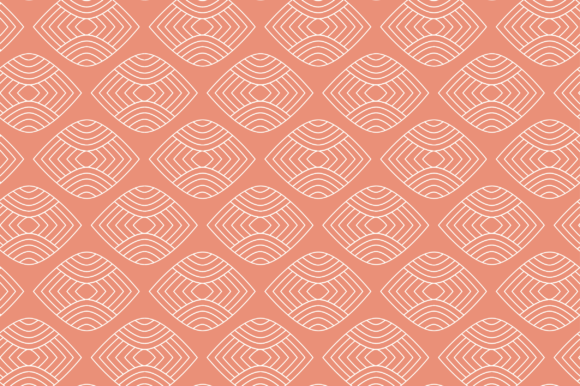
This collection contains multiple geometric patterns, each constructed to tile seamlessly. The designs are abstract and ornamental, built from clean lines and repeating shapes. The emphasis is on symmetry and rhythm, giving you patterns that work equally well as backgrounds, overlaid textures, or standalone decorative elements. Because the patterns are seamless, you can extend them across any canvas size without visible joins, which is essential for wallpapers, fabric prints, and large-format backgrounds.
The five file formats serve different stages of a project. The AI and EPS files are vector-based, which means you can scale the patterns infinitely without losing resolution. These formats are best for editing individual elements, changing colors, or combining patterns with other vector artwork. The SVG file works well for web and UI design, where lightweight, responsive graphics are preferred. The JPG file gives you a high-resolution raster preview, suitable for quick mock-ups or client presentations. The PNG files include transparency, so you can layer the patterns over other content without a white box around them.
Where Geometric Seamless Patterns 04 Fits in Your Workflow
Design workflows are rarely linear. You might start with a mood board, move to rough sketches, then refine through digital iteration. This pattern pack acts as a flexible building block that you can bring in at multiple points.
Before the Project: Preparation and Planning
Before you begin a new design, having a library of reliable patterns saves time. Instead of creating a geometric tile from scratch or searching for free options with uncertain quality, you can open this pack and test several patterns against your initial concept. The vector formats let you adjust colors and scale quickly, so you can evaluate whether a pattern fits your brand guidelines or project mood. This preparation phase is where you also decide on file format. For example, if you are designing a website, you would likely work with the SVG files from the start. If the project involves print, the AI or EPS files give you the control needed for professional output.
During the Creative Process: Execution and Iteration
When you move into the active design phase, the pattern set integrates directly into your software. In Adobe Illustrator, you can open the AI file, expand the pattern swatch, and apply it to any shape or path. In Adobe Photoshop, the JPG or PNG files can be defined as a pattern preset, allowing you to fill layers or selections instantly. The SVG files work well in web design tools like Figma or Sketch, where you can import them as symbols and reuse them across frames. Because the patterns are seamless, you avoid the distraction of fixing tile edges, freeing you to focus on composition and hierarchy.
One of the most practical uses is layering. The PNG files with transparency let you overlay a geometric pattern onto photographs or solid backgrounds. This approach is common in poster design, social media graphics, and presentation slides. You can adjust the opacity, blend mode, or scale of the pattern to create subtle texture or bold ornamentation, depending on the effect you need.
After Project Completion: Delivery and Long-Term Use
Once a design is finalized, you often need to deliver assets in multiple resolutions and formats. Having the pattern available in both vector and raster means you can export exactly what the client or platform requires. For print production, the EPS file can be embedded in the final artwork without any loss. For digital publishing, the SVG or PNG files keep file sizes manageable. The patterns also serve as a reusable resource. If you run a small business or work as a freelancer, you can store these patterns in a central asset library and pull them into future projects. Because the designs are geometric and abstract, they do not date quickly, making them suitable for repeated use across different seasons or campaigns.
Practical Implementation Tips
To get the most from Geometric Seamless Patterns 04, consider these workflow observations.
- Color modification. The vector files (AI, EPS, SVG) contain shapes that you can recolor individually. In Illustrator, you can use the Recolor Artwork tool to shift the entire palette in seconds. This is useful when you need the same pattern in multiple brand colors or seasonal variations.
- Scale adjustment. Seamless patterns depend on the size of the tile relative to your canvas. A pattern that looks dense on a business card may feel sparse on a banner. With vector files, scaling is non-destructive. Experiment with scaling the pattern tile up or down before applying it to a fill.
- Combining patterns. Because the designs share a geometric style, you can layer two patterns from the same set to create depth. For example, use a larger geometric motif at low opacity as a background, then overlay a finer pattern at higher opacity for detail. Test blending modes like Multiply or Screen to see how the patterns interact.
- File organization. Keep the original AI and EPS files in a dedicated assets folder. Rename the patterns descriptively if the filenames are generic. This helps when you are searching for a specific pattern months later. If you work on a team, standardize the folder structure so everyone knows where to find the pattern pack.
- Quality control. Before using any pattern in a final output, check the tile at 100% zoom to confirm there are no visible seams or artifacts. The files in this pack are designed to be seamless, but importing into certain software or scaling incorrectly can sometimes cause edge issues. Quick verification prevents rework.
Integration with Other Tools and Resources
The pattern set does not exist in isolation. It works alongside other design elements like typography, illustrations, and photography. For example, if you are creating a brand identity, you might pair a geometric pattern from this pack with a clean sans-serif font and a set of icons. The patterns provide a consistent visual rhythm that ties the identity together across stationery, packaging, and digital touchpoints.
For motion design, you can import the SVG files into After Effects or Lottie tools and animate the patterns. Scale, rotation, and position changes create moving backgrounds that keep static designs dynamic. The transparent PNG files are also useful for video editing, where you can layer the pattern over footage and animate its opacity or color.
In web development, the SVG format allows developers to maintain crisp patterns at any screen resolution. They can be embedded directly into CSS as background images or inline SVGs, which reduces HTTP requests and improves load times. Because SVGs are code, they can also be manipulated with JavaScript for interactive effects like hover state changes or parallax scrolling.
Observations on Workflow Efficiency
One of the main advantages of using a prepared pattern set like this is the reduction of repetitive tasks. Creating a seamless geometric pattern from scratch involves mathematical precision, often requiring alignment tools, duplicate positioning, and repeated testing. For a single pattern, the process might take thirty minutes to an hour, especially if you want a tile that looks natural and not obviously repeating. With a pack of multiple pre-made patterns, you save that time on every pattern you use. Over several projects, the cumulative time saved can be substantial, allowing you to allocate more time to creative decisions rather than technical setup.
Another observation is the effect on consistency. When you create patterns manually, each one might have slight variations in line weight, spacing, or color handling. A curated set ensures uniform quality and style across the collection. If you are building a cohesive campaign that uses multiple patterns, they will feel like they belong together rather than feeling like unrelated experiments.
From a business perspective, investing in professional assets also supports reliable output quality. Clients and stakeholders expect polished presentations. Using a flawless seamless pattern from this pack, rather than a free online alternative that might have subtle flaws, builds trust and reduces the risk of revisions based on technical errors.
Long-Term Use and Updating
Digital assets depreciate if they are tied to a specific trend or software version. Geometric seamless patterns tend to have a longer useful life because geometry is foundational in design. You can update the colors or apply gradients to modernize the patterns without changing their structure. If you work with brand guidelines that evolve, you can keep the same pattern shapes and simply adjust the palette to match new direction.
Storing the original AI and EPS files ensures you always have the highest quality source. If you later need to export to a format not included in the pack, such as PDF or TIF, you can derive those from the vector source. This future-proofs your work against changing platform requirements.
For educators and bloggers, these patterns serve as ready-made visual aids. You can use them in course materials, presentation slides, or blog featured images. The seamless nature means you can tile the pattern across a full-width background without worrying about awkward cropping or visible repeats. The SVG format is particularly useful for interactive learning content where responsiveness matters.
Final Practical Guidelines
To integrate Geometric Seamless Patterns 04 smoothly into your own routine, start by opening the AI file in your preferred vector editor. Explore each pattern and decide which ones match your project themes. Create a color variation for each pattern that aligns with your brand palette, and save those as separate library items. For raster workflows, open the PNG files in Photoshop and use Edit > Define Pattern to make them accessible in the Pattern Overlay layer style. For web projects, optimize the SVG files by removing unnecessary metadata and compressing them with a tool like SVGO.
Test the patterns on a sample canvas that represents the actual output size. If you are designing a wallpaper, render a portion at full scale to ensure the design behaves as expected. If the pattern is for a mobile app icon background, test it at the thumbnail size to confirm the details are still visible.
Finally, keep a log of which patterns you use and in which projects. Over time, this log helps you see which designs are most versatile and which might need updating. This process turns the pattern set from a one-time download into a long-term component of your design system.
Geometric Seamless Patterns 04 is not a magic solution, but a practical one. It removes friction at the early stages of a project, maintains quality through execution, and provides reusable value long after delivery. Whether you are a freelancer juggling multiple clients, a small business owner creating marketing materials, or a designer building a consistent visual language, this pattern pack fits naturally into the way you already work.