12 Seamless Patterns Sweet Baby Pink: A Versatile Digital Asset for Creative Projects
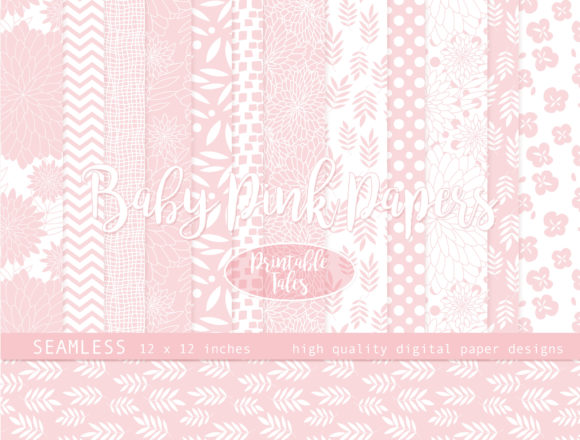
When you need a cohesive, soft palette for a baby girl’s room, a boutique product line, or a handmade gift, the 12 Seamless Patterns Sweet Baby Pink digital paper pack offers a practical solution. This compressed zip file contains 12 individual seamless JPG files, each at 300 dpi and sized 12x12 inches. The collection features hand-drawn florals, delicate lines, leaves, polka dots, chevron, and complementary patterns in pale blush pink and white. Because every pattern is truly seamless, you can place multiple tiles side by side to cover larger surfaces without visible joins—whether working digitally or in print. The commercial use license included with your purchase makes this pack a reliable asset for professionals and hobbyists alike.
Understanding the File Structure and Preparation
Before integrating the patterns into any project, take a moment to organize the downloaded files. The zip archive contains 12 JPG images, each named descriptively. Sorting them into folders by pattern type—florals, lines, polka dots, chevron, etc.—can save time when you’re under deadline. Because the files are 12x12 inches at 300 dpi, they produce crisp prints and high-resolution digital composites. If you work across multiple devices or platforms, store the uncompressed folder in a cloud drive or a local project directory. This upfront preparation ensures you can quickly access the right pattern without digging through archives.
For those using design software such as Adobe Photoshop, Illustrator, Affinity Designer, or Canva, creating a pattern library or swatch set from these JPGs streamlines future use. Load each image into your software, define it as a pattern, and save the set. You can then apply any pattern with a single click, maintaining consistency across a brochure, website mockup, or scrapbook page.
Using Seamless Tiling in Digital Projects
Seamless patterns allow you to fill any canvas size without worrying about edges. In a graphic design workflow, you might use one of the pink floral patterns as a background for an invitation, a blog header, or a social media template. Because the tile repeats infinitely, you can scale it up for an A2 poster or down for a small label—the 300 dpi resolution keeps details sharp. When working in web design, you can export optimized versions for faster loading while maintaining the visual texture.
For digital scrapbooking, the hand-drawn elements add an organic feel. You can overlay photographs, journaling blocks, and stickers onto these backgrounds, adjusting opacity or blending modes to create depth. The chevron and polka dot patterns work well as borders, matting, or envelope liners. Because all patterns share the same blush pink and white palette, mixing them in a single layout remains harmonious.
Print Production and Fabric Printing
If you are printing fabric, wallpaper, wrapping paper, or curtains, the 12x12 inch tile size is convenient for layout planning. Most fabric printing services accept JPG files with color profiles like sRGB or CMYK; confirm your printer’s requirements before submitting. Because the patterns are seamless, you can set your repeating tile to any dimension in your design software. For example, to create a custom wallpaper for a nursery, import the floral pattern into your cutting or printing software, specify a repeat width of 12 inches, and preview how the design flows across the wall. The soft baby pink tones are ideal for a calm, feminine space.
When using these patterns for wrapping paper or curtains, test print a small scale first to verify color accuracy and pattern alignment. The 300 dpi resolution ensures that even fine lines in the hand-drawn leaves remain crisp at actual size. For fabric, consider the fabric’s weave and how the pattern might stretch; ordering a sample yard ahead of production can save material costs.
Practical Implementation for Different Projects
Every creative process has phases where assets like this digital paper pack deliver the most value. Below are a few workflow scenarios covering before, during, and after project stages.
Before a Project: Planning and Moodboarding
When you’re brainstorming a new product line or a baby shower theme, the 12 patterns serve as visual anchors. You can print small swatches and pin them to a mood board alongside fabric samples, paint chips, and ribbon. The combination of florals, geometric chevrons, and organic leaves gives you enough variety to refine a style direction without buying multiple collections. For a small business owner planning a spring collection, these patterns can inspire color stories for clothing, accessories, or stationery.
During a Project: Efficient Asset Assembly
Once a concept is approved, seamless patterns accelerate production. Instead of hand-drawing backgrounds for each page of a baby album, you can load a polka dot pattern and adjust its scale to fit different sizes. For a digital course creator, these patterns can form the base for slide backgrounds, worksheets, and social media graphics, ensuring visual consistency across the entire course. Because the patterns are pre-made, you skip the tedious step of creating repeats from scratch. This efficiency allows you to focus on layout, typography, and content.
After a Project: Refinement and Repurposing
After completing a scrapbook or a fabric run, you may have leftover digital files. The same patterns can be reused in complementary projects—for instance, using a leaf pattern as a subtle watermark on thank-you cards or as a background for product photography. The commercial license means you can incorporate these patterns into items for sale without additional fees. Over time, assembling a library of such versatile assets reduces your reliance on stock photography and allows you to maintain a consistent brand identity across multiple seasons.
Commercial Use and Licensing Considerations
The pack’s inclusion of commercial use rights is a significant advantage for entrepreneurs, bloggers, and small publishers. You can create physical products like wrapping paper, fabric, curtains, and wall art for sale, as well as digital products such as printable planners, invitations, and website backgrounds. However, it’s good practice to read the specific license terms that came with your purchase. Some licenses require that patterns are not resold as standalone digital files; they must be incorporated into a larger design. Understanding these rules prevents legal issues and helps you plan your product line accordingly.
For educators and marketers, using these patterns in presentations, handouts, or promotional materials is usually covered by the commercial license. If you are unsure about a specific use case—such as distributing the patterns as part of a branding kit for clients—contact the seller for clarity. Keeping a copy of the license in your project folder ensures you have it on hand if questions arise during an audit.
Verifying Seamlessness and Resolution
To get the most from these patterns, test the seamless repeat yourself. Open one of the JPG files in your software, offset the image by 50% horizontally and vertically, and look for any visible seam. The hand-drawn nature of the patterns means slight variations are intentional, but they should still tile without hard lines. If you notice any edge artifacts, you can adjust the pattern definition in your software using offsets and cloning. With 300 dpi, you can output prints up to a few feet before resolution becomes noticeable; for larger surfaces like wallpaper, consider scaling the pattern in your layout software and printing at a lower percentage to maintain detail.
Organizing an Asset Library for Repeated Use
Digital assets degrade in value if they are hard to find. Create a systematic naming convention: include the pack name, pattern description, and a version number. For example: “SweetBabyPink_Floral_01.jpg.” Store all files in a folder along with a preview sheet—collage of all 12 patterns saved as a single image. This preview lets you browse the entire collection without opening each file. If you work with a team, add the preview to a shared drive so everyone knows the available options before starting a design.
Over the long term, backup the zip file and the extracted folder in at least two locations. Cloud storage and an external drive both protect against data loss. As you create new projects using these patterns, save final designs in your portfolio folder; you can reference them later for client proof or product diversification.
Tips for Efficient Workflow with Seamless Patterns
- Batch Resizing: If you need patterns at a smaller scale for social media, use batch processing in Photoshop or a free tool like IrfanView to reduce dimensions while keeping the resolution for screen use (72 dpi).
- Color Adjustments: The blush pink and white palette is soft, but you can adjust hue/saturation in your design software to match a specific brand color. Use adjustment layers to non-destructively test variations.
- Combining Multiple Patterns: Create composite backgrounds by layering two patterns with different opacities—for example, a leaf pattern over a polka dot pattern using a multiply blend mode. This adds depth while maintaining a unified color scheme.
- Mockup Generation: Use a mockup template for fabric, wallpaper, or wrapping paper and drop the patterns into smart objects. This gives clients a realistic preview without physical samples.
- Print-Ready Files: When submitting to print services, flatten your files, embed color profiles, and set a bleed if needed. Some printers require PDF format; you can export JPG to PDF with no quality loss.
By treating the 12 Seamless Patterns Sweet Baby Pink pack as a system—rather than a one-off download—you can integrate it into your regular creative workflow. Whether you are a graphic designer preparing a client mood board, a mom creating a baby album, or an entrepreneur launching a new product line, these patterns reduce repetitive work and let you focus on composition and storytelling. The hand-drawn quality gives your projects a personal touch that stock graphics often lack, and the commercial license protects your business as you scale. With proper organization and a little experimentation, this digital paper pack becomes a reliable resource you will reach for again and again.